
Your personal
AI gateway.
API Concierge runs on your machine and sits between your AI tools and your providers. Every tool gets a local proxy URL and token. Your real API keys never leave your machine.
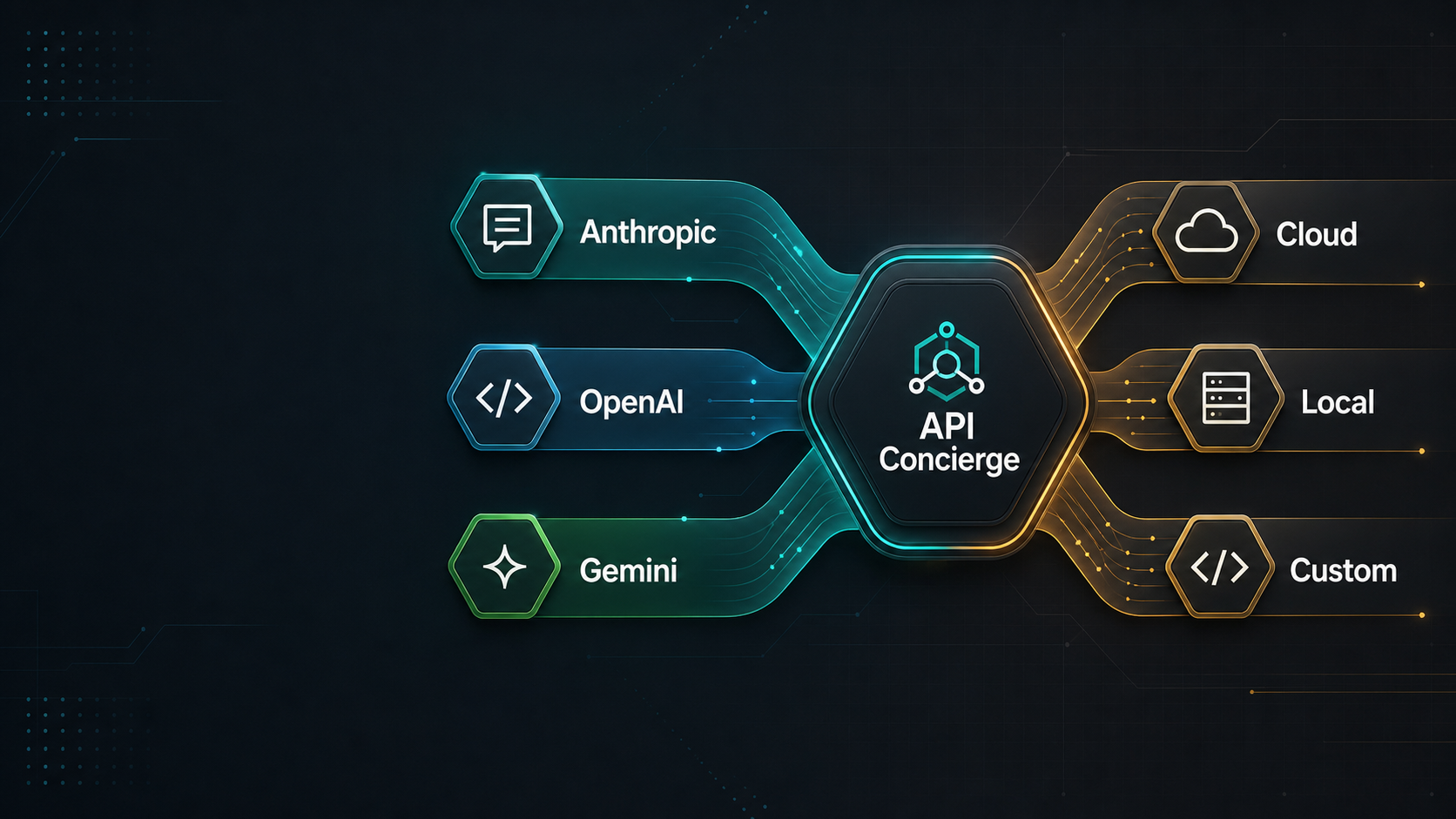
Works with any AI client
One proxy. Every tool. Real keys stay local.
The problem
Your AI keys are everywhere.
They shouldn't be.
The more AI tools you use, the worse the problem gets. Keys end up in cloud panels, .env files, and IDE settings — scattered across every tool that asked for one. API Concierge gives every tool a local proxy token instead.
Every AI tool wants your API keys
Claude Code, Cursor, Aider, Open WebUI — each asks for a raw API key. More tools means more places your credentials live, and more chances for them to be exposed.
Protocol fragmentation locks you in
Claude Code only speaks Anthropic. Cursor only speaks OpenAI. If you want Claude Code to use a DeepSeek model, the protocols don't match and you're stuck.
Switching providers means updating everything
Every time you move from one provider to another, you're changing settings in multiple apps. Every new tool you try means another key to track down and paste.
Keys end up in too many places
Raw keys pasted into cloud settings panels, .env files, IDE configs, and app dashboards. You lose track of what's exposed and where — until something goes wrong.
No clean way to revoke access
When you rotate a key or stop using a service, you have to hunt down every place that key was pasted. There's no single point of control.
How it works
Route by model ID.
Translate at the edge.
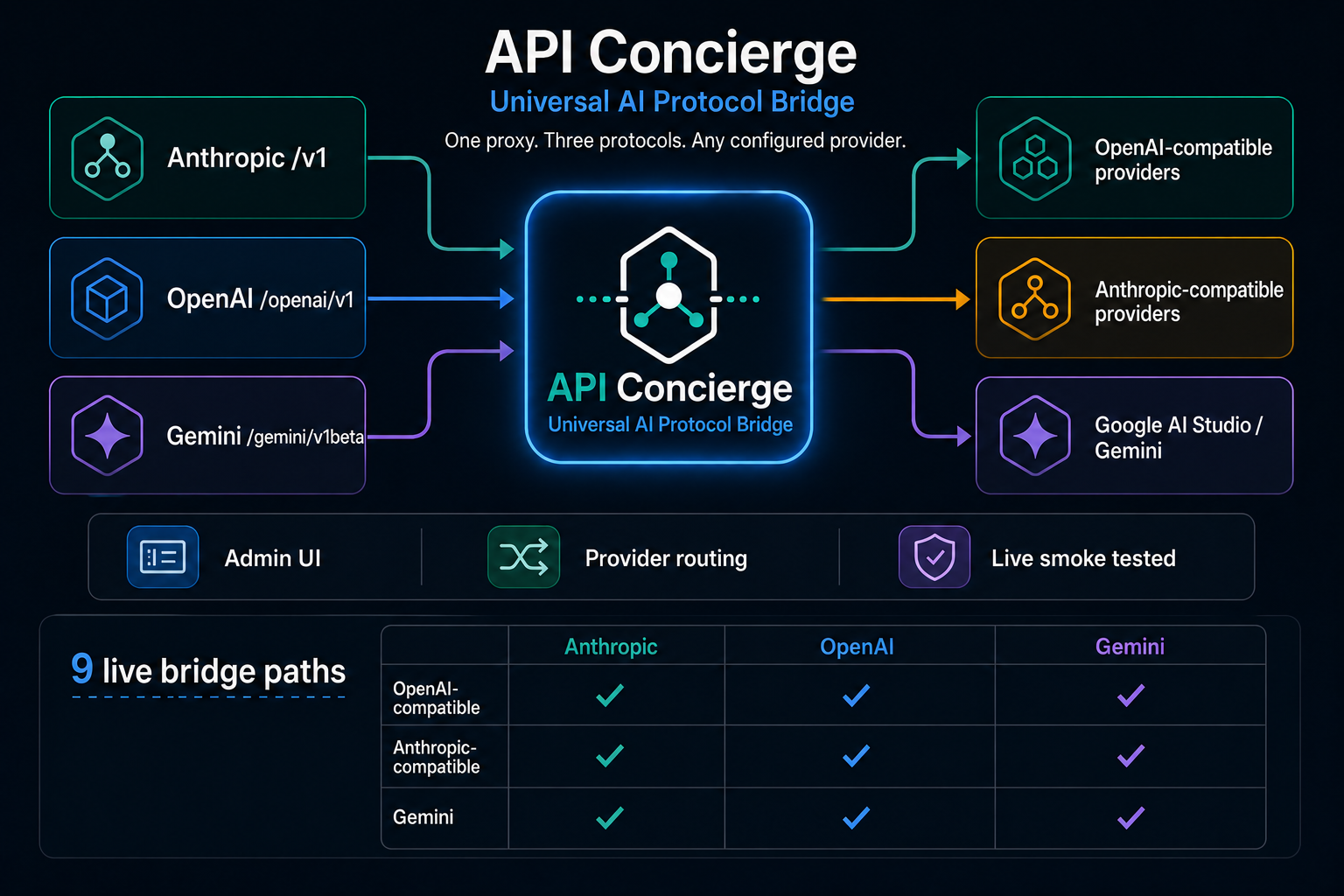
API Concierge uses provider-prefixed model IDs to route every request to the right upstream. The same model ID works across all three endpoint shapes — no per-client configuration needed.
Client sends request
Any Anthropic, OpenAI-compatible, or Gemini-compatible client hits the local proxy on port 8082.
Route by model ID
API Concierge reads the provider-prefixed model ID and selects the configured upstream provider and transport.
Translate at the edge
The request is converted to the upstream provider's native format. Streaming responses are translated back to the client's expected shape.
Response returned
The client receives a response in its own protocol. No client-side changes required.
Use the same provider-prefixed model ID across every endpoint:
# Provider-prefixed model IDs
google_ai_studio/gemini-2.5-flashnvidia_nim/z-ai/glm-5.1openrouter_strategic/openrouter/owl-alphadeepseek/deepseek-chatThe prefix before the first / identifies the configured provider. Everything after is passed to the upstream as-is.
Endpoint matrix
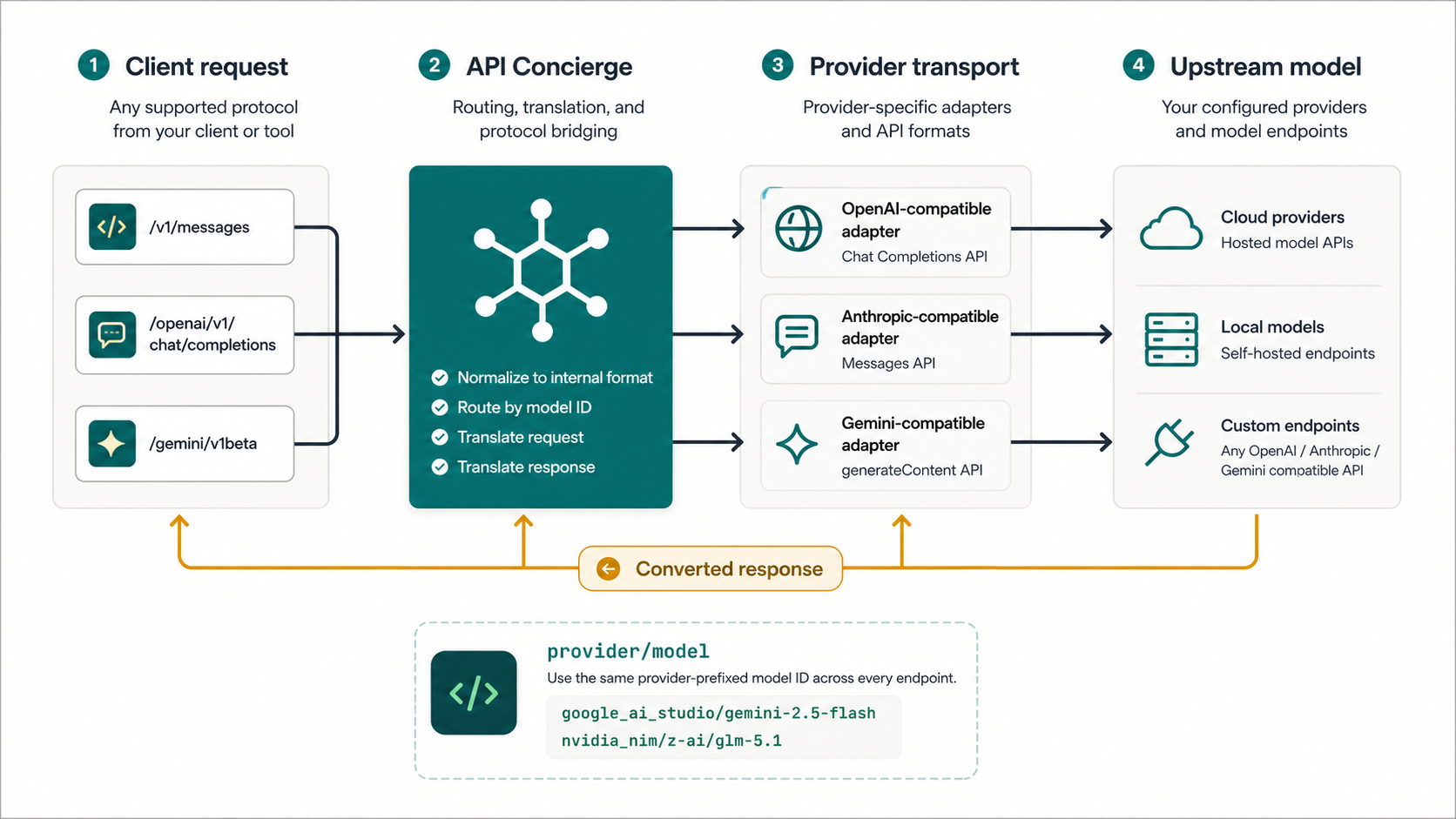
Three endpoint shapes.
Nine live bridge paths.
Every provider type routes correctly through every endpoint shape. The repo includes test_all_endpoints.py, a live example that sends real prompts through all 9 provider-by-endpoint combinations.
Provider type
Anthropic
/v1/messagesOpenAI
/openai/v1/chat/completionsGemini
/gemini/v1betaOpenAI-compatible provider
OpenRouter, NVIDIA NIM, LM Studio
transport: openai_chatAnthropic-compatible provider
DeepSeek, Ollama (anthropic mode)
transport: anthropic_messagesGemini provider
Google AI Studio, Vertex AI
transport: google_aiRun the live smoke test
Configure providers in the admin UI, then verify every bridge path in one command.
uv run test_all_endpoints.pyAdmin UI
Configure providers without
editing adapter code.
The built-in admin UI at localhost:8082/admin manages providers, model lists, and Claude Code routing presets without touching your proxy code.
API Concierge
Admin console
Active: api.z.ai
0.0.0.0:8082
DASHBOARD
Control Room
Providers
9
Enabled
5
Models
58
Configs
4
Active Config
Active785eab8c-868f-4bdf-a18f-cd452372f0ec
moonshotai/kimi-k2.6z-ai/glm-5.1qwen/qwen3.7-maxdeepseek/deepseek-v4-proProvider Mix
5 records in concierge.json
NVIDIA NIM
nvidia_nim · openai_compatible
DeepSeek
deepseek · anthropic_compatible
LM Studio
lmstudio · anthropic_compatible
llama.cpp
llamacpp · anthropic_compatible
Ollama Local
ollama · openai_compatible
Live admin UI at localhost:8082/admin
Add providers from the admin UI — no config files to edit
Store API keys and base URLs securely in local config
Fetch available models or add them manually
Activate Claude Code presets with one click
Test provider connections before routing live traffic
Use readable provider-prefixed routing IDs everywhere
Claude Code Configs
Map Haiku, Sonnet, Opus, and Subagent roles to any configured provider model. Activate a preset and API Concierge writes the correct environment to your Claude Code settings.
moonshotai/kimi-k2.6z-ai/glm-5.1qwen/qwen3.7-maxdeepseek/deepseek-v4-proQuick start
Zero to first AI reply
in under five minutes.
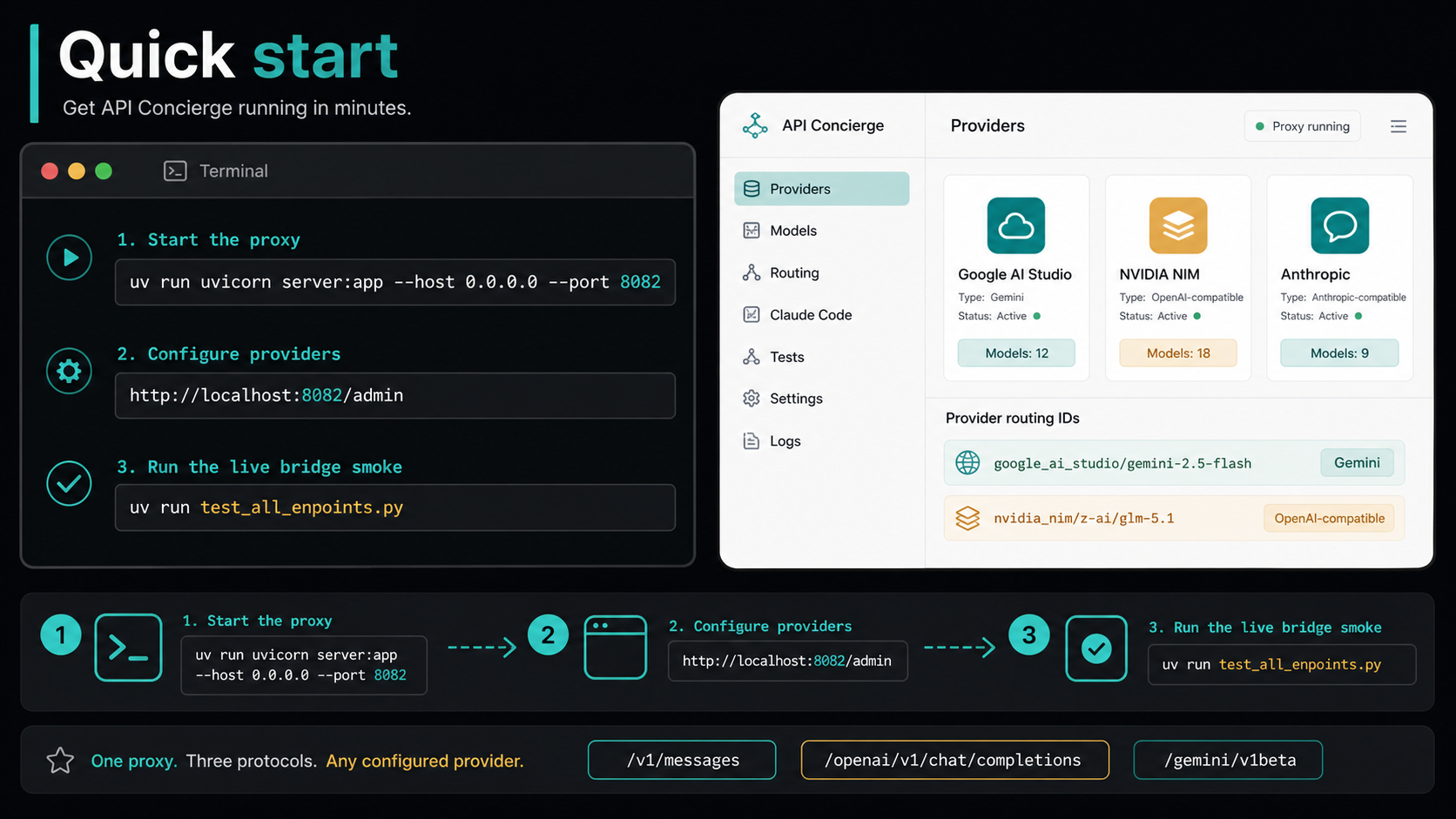
Download the portable app, launch it, add a provider through the setup wizard, and paste the proxy credentials into any AI tool. No config files to edit. No documentation to read.
No installer. Extract to any folder. Windows, macOS, and Linux supported.
Double-click API Concierge.exe (or the platform binary)The admin UI opens at localhost:8082/admin. The setup wizard appears automatically on first launch.
Pick a provider → paste API key → click Test KeySupports OpenRouter, DeepSeek, NVIDIA NIM, Google AI Studio, Ollama, LM Studio, and any OpenAI- or Anthropic-compatible endpoint.
Copy proxy URL + token → paste into Claude Code, Cursor, Aider…The wizard shows ready-to-paste credentials for Anthropic-format, OpenAI-format, and Gemini-format tools.
Prefer running from source? Clone the repo and run uv run uvicorn server:app --host 0.0.0.0 --port 8082. Requires Python 3.14 and uv.
Use cases
Built for people who keep
testing the next model.
Whether you use Claude Code, Cursor, Aider, or all three — API Concierge removes the key-management and protocol friction so you can focus on what you're actually building.
Use DeepSeek or any provider in Claude Code
Point Claude Code's proxy URL at API Concierge and activate a config that routes to your preferred provider. Claude Code doesn't change — just swap what's behind the proxy.
Use Anthropic models in Cursor
Cursor speaks OpenAI format. API Concierge translates on the fly. Point Cursor at the /openai/v1 endpoint and route to any Anthropic-native or other provider without touching your IDE settings.
Try Gemini free tier in any AI tool
Add Google AI Studio as a provider. Use Gemini models from Claude Code, Cursor, or any tool — regardless of which protocol that tool expects. One API key, three client shapes.
One URL for every AI tool you use
Give every tool the same local proxy URL. When you switch providers or rotate a key, change one setting in the admin UI — all connected tools update automatically.
Keep real keys out of your .env files
Providers are configured once in the local admin GUI. Connected apps get a proxy token, not your real API key. If a tool is compromised or discontinued, revoke one token.
Compare providers without rewiring anything
Add multiple providers with their API keys. Switch which one handles traffic by changing a model ID prefix. No client rewrites, no .env edits, no reconfiguration.
Your keys stay local.
Your tools stay unchanged.
API Concierge is free, self-hosted, and built to stay out of your way. Add providers through the setup wizard, configure routing in one place, and give every AI tool a proxy token instead of your real API key.
/v1/messages/openai/v1/chat/completions/gemini/v1betaWhat you get
Real API keys stored once, locally — never pasted into multiple tools
Every AI tool gets a proxy token it can't use outside your machine
Switch providers by changing one setting — all tools continue working
Use any provider with any AI client, regardless of protocol
Built-in setup wizard — zero to first reply in under five minutes
No telemetry, no accounts, no cloud dependency